

Phiên bản mới nhất
Phiên bản
1.18
1.18
Cập nhật
March 12, 2024
March 12, 2024
Nhà phát triển
Implement your craziest ideas
Implement your craziest ideas
Thể Loại
Đa phương tiện
Đa phương tiện
Nền tảng
iOS
iOS
Kích thước tập tin
109.4 MB
109.4 MB
Tải ngay
0
0
Giấy phép
Free
Free
Báo cáo
Báo cáo sự cố
Báo cáo sự cố
Thông tin thêm về Monet - AI Photo Editor
Monet is a simple yet powerful tool for photo editing and image generation. It's like Photoshop in your pocket, but easy to use. Monet uses advanced AI technology to remove or add objects, extend the boarders and improve the quality of your photos.
ADD & REPLACE
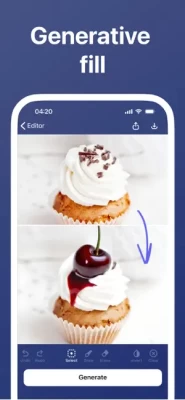
Import your photo, mark the area where you want to add a new object or replace an existing one, type in description of what should appear in that place, tap Generate and check out the result. You may want to fine tune generation with Advanced settings, like “Image strength” or “Negative prompt”. Easily undo undesired changes of your photo. Tap Apply to save your work and continue later.
ERASE
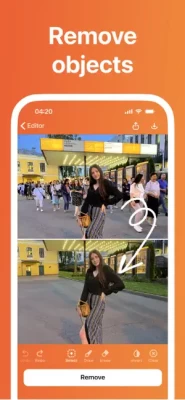
Import your photo, mark the area you want to be filled with background and tap Erase. Monet’s AI is able to remove objects like they never exist on the photo! You may want to check different edits by tapping Erase several times. Tap Apply to save your current work.
UNCROP
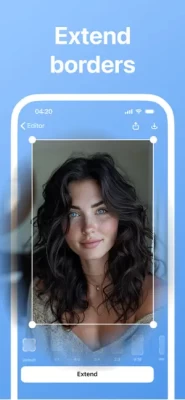
To extend the borders of you photo, first import your photo and choose the aspect ratio of the canvas. Move and scale your photo inside the canvas. Tap on Generate to fill the borders. You may want to try several times and choose the best variant.
UPSCALE
Improve quality and increase the dimensions of your photo up to 4k. Just import your photo and tap on Upscale on the project screen.
OUTFITS
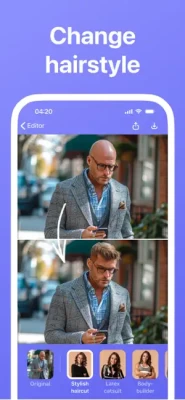
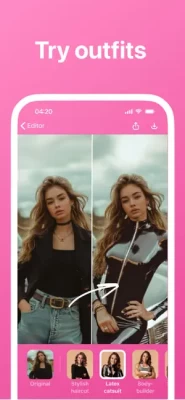
Have fun with cool filters. Try different styles: business look, a superman, an athlete, wearing a latex catsuit and many more. Import your photo, tap on any filter in Outfits. Tap more to get variations.
CREATE IMAGES
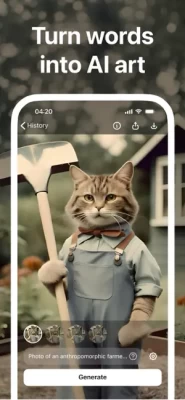
Are you a designer and looking for a special image for your work? You can easily generate it in Monet: on the main screen, choose "Create image from text", then describe what you want to generate, tap Generate and get a batch of images. You can generate a similar image following the style of the original one by tapping on Variations.
Terms of use: https://avatarify.ai/monet_tos
Privacy policy: https://avatarify.ai/monet_pp
Need help or have an idea? Drop us a couple of lines at: monet@avatarify.ai
Import your photo, mark the area where you want to add a new object or replace an existing one, type in description of what should appear in that place, tap Generate and check out the result. You may want to fine tune generation with Advanced settings, like “Image strength” or “Negative prompt”. Easily undo undesired changes of your photo. Tap Apply to save your work and continue later.
ERASE
Import your photo, mark the area you want to be filled with background and tap Erase. Monet’s AI is able to remove objects like they never exist on the photo! You may want to check different edits by tapping Erase several times. Tap Apply to save your current work.
UNCROP
To extend the borders of you photo, first import your photo and choose the aspect ratio of the canvas. Move and scale your photo inside the canvas. Tap on Generate to fill the borders. You may want to try several times and choose the best variant.
UPSCALE
Improve quality and increase the dimensions of your photo up to 4k. Just import your photo and tap on Upscale on the project screen.
OUTFITS
Have fun with cool filters. Try different styles: business look, a superman, an athlete, wearing a latex catsuit and many more. Import your photo, tap on any filter in Outfits. Tap more to get variations.
CREATE IMAGES
Are you a designer and looking for a special image for your work? You can easily generate it in Monet: on the main screen, choose "Create image from text", then describe what you want to generate, tap Generate and get a batch of images. You can generate a similar image following the style of the original one by tapping on Variations.
Terms of use: https://avatarify.ai/monet_tos
Privacy policy: https://avatarify.ai/monet_pp
Need help or have an idea? Drop us a couple of lines at: monet@avatarify.ai
Đánh giá ứng dụng
Thêm nhận xét và đánh giá
Đánh giá của người dùng
Dựa trên 0 đánh giá
Chưa có đánh giá nào được thêm vào.
Các bình luận sẽ không được chấp thuận để đăng nếu chúng là SPAM, lạm dụng, lạc đề, sử dụng ngôn từ tục tĩu, chứa đựng sự tấn công cá nhân hoặc kích động sự thù ghét dưới bất kỳ hình thức nào.











Xem thêm »

Phổ biến nhất

MiniTool Power Data Recovery Free 8.5.0MiniTool Solution Ltd.

Zalo PCZalo Group

Dingtone: Calling & TextingPhone call & text message app

Payback 2 - The Battle SandboxApex Designs Games LLP

MBCambodia My BankMB Bank

Top Football Manager 2024Gamegou Limited

Duolingo: Học ngoại ngữDuolingo

War Thunder MobileTanks, ships and aircraft

King of boxingKEENGAME

Đấu trường OnmyojiDZOGAME Viet Nam
Xem thêm »
Công cụ hữu ích

TikTokTikTok Pte. Ltd.

FacebookMeta Platforms, Inc.

HWiNFO7.68REALiX
Zalo PCZalo Group
War Thunder MobileTanks, ships and aircraft

Grim Soul: Dark Survival RPGBrickworks Games Ltd

Craft of Survival - Gladiators101XP LIMITED

Last Shelter: SurvivalLong Tech Network Limited

Dawn of Zombies: Survival GameRoyal Ark

Merge Survival : WastelandStickyHands Inc.
 Games - Trò chơi
 Mạng Xã Hội
 Email - Chat - Gọi Điện
 Ứng Dụng Giải Trí
 Bảo Mật
 Phần mềm hệ thống
 Đa phương tiện
 Internet
 Tài Chính- mua sắm
 Thiết Kế
 Giáo Dục
 Công Nghệ Thông Tin
 Du lịch và địa điểm
 Android
 iOS
iOS Windows
 Mac
Mac Linux
Linux Web
Web