

Phiên bản mới nhất
Phiên bản
2.0.7
2.0.7
Cập nhật
April 15, 2024
April 15, 2024
Nhà phát triển
Share panoramas on Instagram
Share panoramas on Instagram
Thể Loại
Đa phương tiện
Đa phương tiện
Nền tảng
iOS
iOS
Kích thước tập tin
10.4 MB
10.4 MB
Tải ngay
0
0
Giấy phép
Free
Free
Báo cáo
Báo cáo sự cố
Báo cáo sự cố
Thông tin thêm về PanoSlicer
PanoSlicer is the easiest way to share your panoramas on Instagram! Check out @PanoSlicer on Instagram to see PanoSlicer in action.
PanoSlicer helps you take advantage of Instagram's multi-image posts by slicing your panoramas into square pieces that can be uploaded at the same time into a seamless panorama that can swiped through on Instagram.
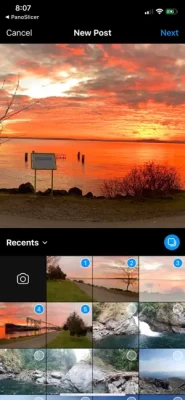
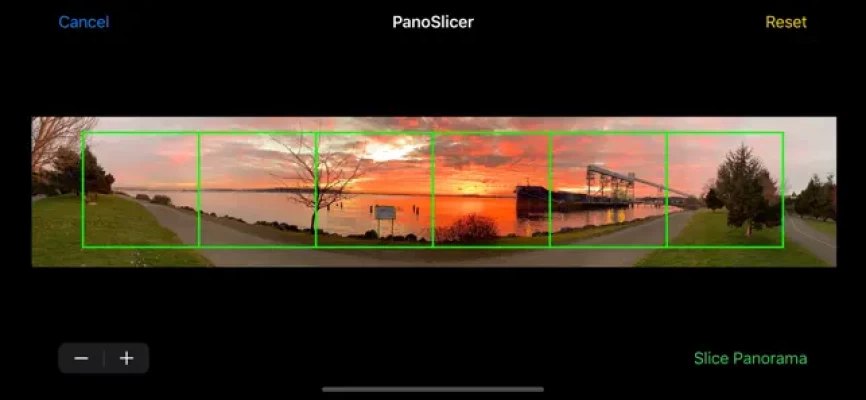
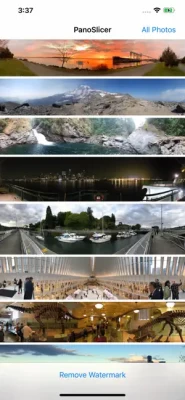
1) PanoSlicer displays thumbnails of all the panoramas* in your photo library. Simply tap the panorama you want to upload to Instagram, and customize the slicing by choosing the number of slices you want (up to Instagram's limit of 10) and which part of the panorama to slice by scrolling and zooming. After tapping on the "Slice Panorama" button, PanoSlicer slices your panorama into squares (keeping the original intact, of course), saves those slices to your photo library, and then automatically opens the Instagram uploader for you.
2) Use Instagram's "select multiple" option to upload your sliced panorama. PanoSlicer saves the slices to your photo library so that it's easy to select them in the correct order in Instagram's uploader.
3) Finish your upload and enjoy sharing your full panorama on Instagram!
PanoSlicer is free to try before you buy and initially adds a watermark to the images it creates. If you decide that PanoSlicer suits your needs, you can make an in-app purchase to unlock PanoSlicer so that it slices your panoramas without adding the watermark.
*Panoramas are defined as images with a height of more than 800 pixels and an aspect ratio (width/height) of at least 2.75. If you want to slice images that aren't recognized as panoramas, tap the "All Photos" button to browse your entire photo library.
1) PanoSlicer displays thumbnails of all the panoramas* in your photo library. Simply tap the panorama you want to upload to Instagram, and customize the slicing by choosing the number of slices you want (up to Instagram's limit of 10) and which part of the panorama to slice by scrolling and zooming. After tapping on the "Slice Panorama" button, PanoSlicer slices your panorama into squares (keeping the original intact, of course), saves those slices to your photo library, and then automatically opens the Instagram uploader for you.
2) Use Instagram's "select multiple" option to upload your sliced panorama. PanoSlicer saves the slices to your photo library so that it's easy to select them in the correct order in Instagram's uploader.
3) Finish your upload and enjoy sharing your full panorama on Instagram!
PanoSlicer is free to try before you buy and initially adds a watermark to the images it creates. If you decide that PanoSlicer suits your needs, you can make an in-app purchase to unlock PanoSlicer so that it slices your panoramas without adding the watermark.
*Panoramas are defined as images with a height of more than 800 pixels and an aspect ratio (width/height) of at least 2.75. If you want to slice images that aren't recognized as panoramas, tap the "All Photos" button to browse your entire photo library.
Đánh giá ứng dụng
Thêm nhận xét và đánh giá
Đánh giá của người dùng
Dựa trên 0 đánh giá
Chưa có đánh giá nào được thêm vào.
Các bình luận sẽ không được chấp thuận để đăng nếu chúng là SPAM, lạm dụng, lạc đề, sử dụng ngôn từ tục tĩu, chứa đựng sự tấn công cá nhân hoặc kích động sự thù ghét dưới bất kỳ hình thức nào.















Xem thêm »

Phổ biến nhất

MiniTool Power Data Recovery Free 8.5.0MiniTool Solution Ltd.

Zalo PCZalo Group

Dingtone: Calling & TextingPhone call & text message app

Payback 2 - The Battle SandboxApex Designs Games LLP

MBCambodia My BankMB Bank

Top Football Manager 2024Gamegou Limited

Duolingo: Học ngoại ngữDuolingo

War Thunder MobileTanks, ships and aircraft

King of boxingKEENGAME

Đấu trường OnmyojiDZOGAME Viet Nam
Xem thêm »
Công cụ hữu ích

TikTokTikTok Pte. Ltd.

FacebookMeta Platforms, Inc.

HWiNFO7.68REALiX
Zalo PCZalo Group
War Thunder MobileTanks, ships and aircraft

Grim Soul: Dark Survival RPGBrickworks Games Ltd

Craft of Survival - Gladiators101XP LIMITED

Last Shelter: SurvivalLong Tech Network Limited

Dawn of Zombies: Survival GameRoyal Ark

Merge Survival : WastelandStickyHands Inc.
 Games - Trò chơi
 Mạng Xã Hội
 Email - Chat - Gọi Điện
 Ứng Dụng Giải Trí
 Bảo Mật
 Phần mềm hệ thống
 Đa phương tiện
 Internet
 Tài Chính- mua sắm
 Thiết Kế
 Giáo Dục
 Công Nghệ Thông Tin
 Du lịch và địa điểm
 Android
 iOS
iOS Windows
 Mac
Mac Linux
Linux Web
Web