

Phiên bản mới nhất
Phiên bản
1.28
1.28
Cập nhật
May 25, 2024
May 25, 2024
Nhà phát triển
All-In-One PTZ Management App
All-In-One PTZ Management App
Thể Loại
Đa phương tiện
Đa phương tiện
Nền tảng
iOS
iOS
Kích thước tập tin
132.3 MB
132.3 MB
Tải ngay
0
0
Giấy phép
Free
Free
Báo cáo
Báo cáo sự cố
Báo cáo sự cố
Thông tin thêm về PTZControl Pro 2 by PTZOptics™
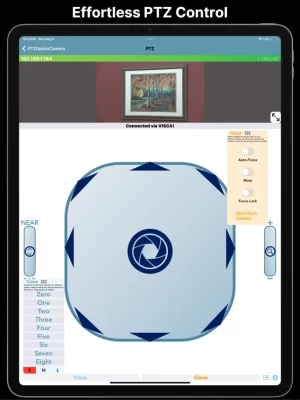
PTZControl Pro 2 is a PTZ camera control application available for iOS devices. This app features easy PTZOptics camera setup with powerful features allowing you to wirelessly control your camera with ease.
Top Features:
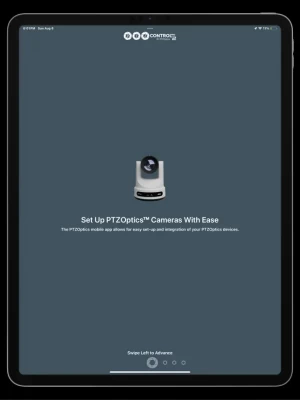
Set up PTZOptics Cameras With Ease
The PTZOptics mobile app allows for easy setup and integration of your PTZOptics cameras.
Stream your camera to anywhere!
No need to use fancy encoding software and hardware. You can set up your PTZOptics camera to stream directly to any RTMP server.
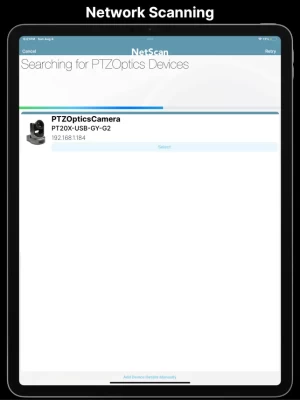
Automatically discover your cameras
PTZControl Pro 2 can quickly scan your network for PTZOptics devices and discover them.
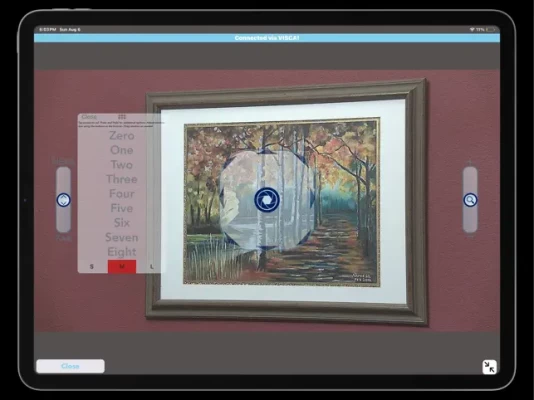
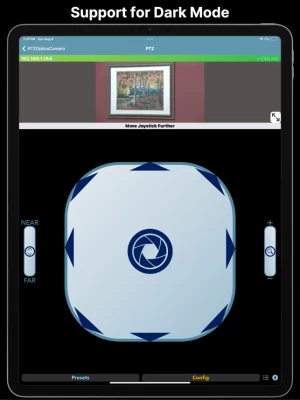
Pan, Tilt, Zoom, Focus and View!
Remotely control the PTZF functionality of your PTZOptics cameras, and view the RTSP video feed at the same time, right from this app.
Color correction tools
Quickly adjust brightness, contrast or sharpness of your camera right from your phone with a live video preview.
Free Updates
This is the latest version of PTZControl Pro. Enjoy free updates for the life of this application.
Camera Manual Access
Gain instant access to your camera’s manual directly through the app.
Voice Control
Use your voice to control PTZOptics cameras. Helper app required, see more below.
Features Continued
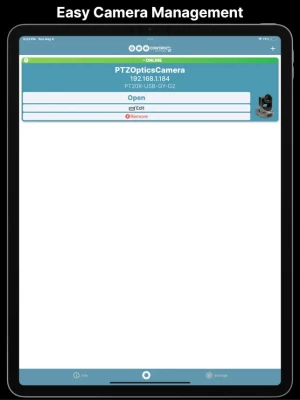
- Online/offline indicators on the application's home page for each camera
- Variable PTZ speed control offers more dynamic camera control versus constant speed control
- PTZ Control screen has an immersive full screen experience when using it in landscape mode
- Floating Presets Window
- Tilt Control Mode which when turned on allows the user to control PT functionality by tilting their device
- Support for Keyboard Control
- If a physical keyboard is attached to the user's device (such as an Apple Magic/Smart Keyboard Folio or any Bluetooth keyboard the user has paired to the device), the user can use the arrow keys to control PT and use the + and - key to control Zoom.
- Supports Voice-activated presets (requires helper app) which allows the user to summon a preset simply by saying its name
- There is an Image, Exposure, Color Section
- There is an OSD Menu section that allows users to control OSD right from the app
- There is a Config section that displays all of the Cameras configuration preferences and allows the user to modify IP address settings
- There is a Stream to RTMP section that allows the user to encode their camera's RTSP stream to a specified RTMP URL.
- There is a section that allows the user to view the Camera's manual as well as its tutorial video from the PTZOptics channel.
- The app features a "Volunteer Mode" that, when activated, disables users from deleting, editing, or adding cameras until it is deactivated. This is intended for users that want to pass their device to volunteers/employees but don't want them to modify settings.
- Support for Sony and Panasonic PTZ cameras (PTZ Only).
Set up PTZOptics Cameras With Ease
The PTZOptics mobile app allows for easy setup and integration of your PTZOptics cameras.
Stream your camera to anywhere!
No need to use fancy encoding software and hardware. You can set up your PTZOptics camera to stream directly to any RTMP server.
Automatically discover your cameras
PTZControl Pro 2 can quickly scan your network for PTZOptics devices and discover them.
Pan, Tilt, Zoom, Focus and View!
Remotely control the PTZF functionality of your PTZOptics cameras, and view the RTSP video feed at the same time, right from this app.
Color correction tools
Quickly adjust brightness, contrast or sharpness of your camera right from your phone with a live video preview.
Free Updates
This is the latest version of PTZControl Pro. Enjoy free updates for the life of this application.
Camera Manual Access
Gain instant access to your camera’s manual directly through the app.
Voice Control
Use your voice to control PTZOptics cameras. Helper app required, see more below.
Features Continued
- Online/offline indicators on the application's home page for each camera
- Variable PTZ speed control offers more dynamic camera control versus constant speed control
- PTZ Control screen has an immersive full screen experience when using it in landscape mode
- Floating Presets Window
- Tilt Control Mode which when turned on allows the user to control PT functionality by tilting their device
- Support for Keyboard Control
- If a physical keyboard is attached to the user's device (such as an Apple Magic/Smart Keyboard Folio or any Bluetooth keyboard the user has paired to the device), the user can use the arrow keys to control PT and use the + and - key to control Zoom.
- Supports Voice-activated presets (requires helper app) which allows the user to summon a preset simply by saying its name
- There is an Image, Exposure, Color Section
- There is an OSD Menu section that allows users to control OSD right from the app
- There is a Config section that displays all of the Cameras configuration preferences and allows the user to modify IP address settings
- There is a Stream to RTMP section that allows the user to encode their camera's RTSP stream to a specified RTMP URL.
- There is a section that allows the user to view the Camera's manual as well as its tutorial video from the PTZOptics channel.
- The app features a "Volunteer Mode" that, when activated, disables users from deleting, editing, or adding cameras until it is deactivated. This is intended for users that want to pass their device to volunteers/employees but don't want them to modify settings.
- Support for Sony and Panasonic PTZ cameras (PTZ Only).
Đánh giá ứng dụng
Thêm nhận xét và đánh giá
Đánh giá của người dùng
Dựa trên 0 đánh giá
Chưa có đánh giá nào được thêm vào.
Các bình luận sẽ không được chấp thuận để đăng nếu chúng là SPAM, lạm dụng, lạc đề, sử dụng ngôn từ tục tĩu, chứa đựng sự tấn công cá nhân hoặc kích động sự thù ghét dưới bất kỳ hình thức nào.














Xem thêm »

Phổ biến nhất

MiniTool Power Data Recovery Free 8.5.0MiniTool Solution Ltd.

Zalo PCZalo Group

Dingtone: Calling & TextingPhone call & text message app

Payback 2 - The Battle SandboxApex Designs Games LLP

MBCambodia My BankMB Bank

Top Football Manager 2024Gamegou Limited

Duolingo: Học ngoại ngữDuolingo

King of boxingKEENGAME

War Thunder MobileTanks, ships and aircraft

Đấu trường OnmyojiDZOGAME Viet Nam
Xem thêm »
Công cụ hữu ích

TikTokTikTok Pte. Ltd.

FacebookMeta Platforms, Inc.

HWiNFO7.68REALiX
Zalo PCZalo Group
War Thunder MobileTanks, ships and aircraft

Grim Soul: Dark Survival RPGBrickworks Games Ltd

Craft of Survival - Gladiators101XP LIMITED

Last Shelter: SurvivalLong Tech Network Limited

Dawn of Zombies: Survival GameRoyal Ark

Merge Survival : WastelandStickyHands Inc.
 Games - Trò chơi
 Mạng Xã Hội
 Email - Chat - Gọi Điện
 Ứng Dụng Giải Trí
 Bảo Mật
 Phần mềm hệ thống
 Đa phương tiện
 Internet
 Tài Chính- mua sắm
 Thiết Kế
 Giáo Dục
 Công Nghệ Thông Tin
 Du lịch và địa điểm
 Android
 iOS
iOS Windows
 Mac
Mac Linux
Linux Web
Web