


Phiên bản mới nhất
Phiên bản
6.6
6.6
Cập nhật
December 28, 2023
December 28, 2023
Nhà phát triển
Picture with music slide show
Picture with music slide show
Thể Loại
Đa phương tiện
Đa phương tiện
Nền tảng
iOS
iOS
Kích thước tập tin
228.6 MB
228.6 MB
Tải ngay
0
0
Giấy phép
Free
Free
Báo cáo
Báo cáo sự cố
Báo cáo sự cố
Thông tin thêm về SlideShow Maker Photo to Video
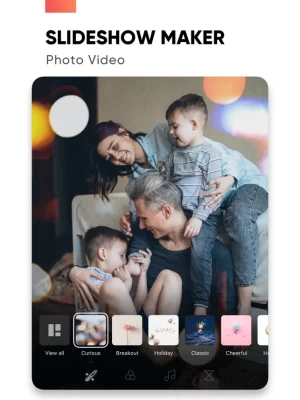
Create slideshows with SlideShow Maker Photo Video using your own photos & videos from your camera roll and add music to your video slide show!
Make your own slideshow in just a few taps choosing from a great mood collection - from happy birthday to Mother's day, celebration or family, find your own style!
Add photo, video, and music to your slideshow movie creation and share it with friends and family.
FEATURES:
1) Slideshow maker :
- Add your photos to video
- Add music to video
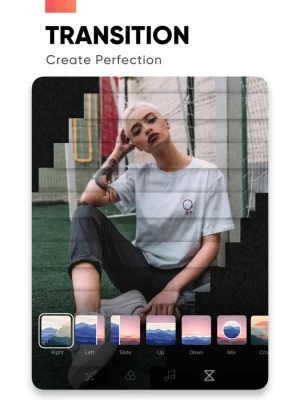
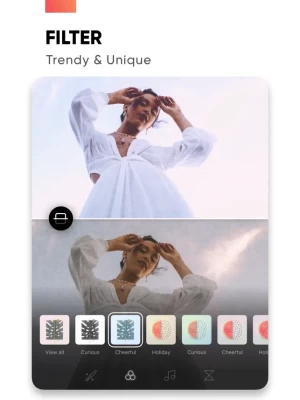
- Add transition, overlay and trendy filter to your slideshow video
- Change duration per photo
2) Powerful Photo Editor:
- Edit frame rate of photos, flip and rotate photos, add filters effects per photo in your slideshow
- Reorder all your photos and delete or add more photos in your video slideshow
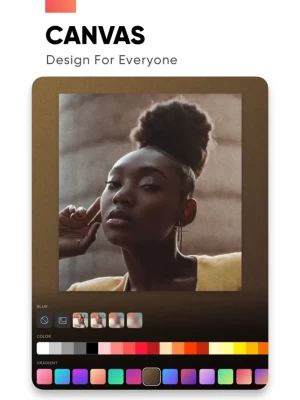
- Using the Canvas feature to enhance your photo
- Unique movement effect for your video slideshow.
3) Perfect Customize Music:
- Import music from the music library to make a slideshow with or use a song from your own iTunes collection (subject to iTunes terms).
- Remove or cut any part of audio with precision
- Adjust your audio duration for a perfect result.
- Trim, fade-in, fade-out for audio, music.
4) High-quality slideshow video for sharing:
- Save slideshow to your library in up to HD 1080p.
- Share with your friends on Facebook, Instagram, YouTube, or other social media, and get likes from them
PREMIUM SUBSCRIPTION
- Subscription start from USD 2.99.
- a 1-week subscription with 3 days free trial
- a 1-month subscription
- a 1-year subscription
• Check in app for exact pricing in your region
• Payment will be charged to your iTunes account at confirmation of purchase and will automatically renew (at the duration/price selected) unless auto-renew is turned off at least 24 hours before the end of the current period.
• Account will be charged for renewal within 24-hours prior to the end of the current period, and identify the cost of the renewal.
• Any unused portion of a free trial period, if offered, will be forfeited when the user purchases a subscription to that publication, where applicable
• You can manage your subscription and/or turn off auto-renewal by going to your iTunes Account Settings, but refunds will not be given for any unused portion of the term.
Terms of Service: https://www.maplelabs.co/policies/#terms
Privacy: https://www.maplelabs.co/policies/#terms
For complete access to all app features, you will need to allow access to the following:
- Photos library – so you can pick photos to slideshow maker and save slideshow video when you finish
- Music library - so you can pick favourite songs or attractive songs to slideshow maker and make slideshow lively.
If you have any feedback, please send us your email to support@maplelabs.co Please leave a review on the App Store if you love using the app. We cannot wait to hear from you and we always appreciate your support.
Add photo, video, and music to your slideshow movie creation and share it with friends and family.
FEATURES:
1) Slideshow maker :
- Add your photos to video
- Add music to video
- Add transition, overlay and trendy filter to your slideshow video
- Change duration per photo
2) Powerful Photo Editor:
- Edit frame rate of photos, flip and rotate photos, add filters effects per photo in your slideshow
- Reorder all your photos and delete or add more photos in your video slideshow
- Using the Canvas feature to enhance your photo
- Unique movement effect for your video slideshow.
3) Perfect Customize Music:
- Import music from the music library to make a slideshow with or use a song from your own iTunes collection (subject to iTunes terms).
- Remove or cut any part of audio with precision
- Adjust your audio duration for a perfect result.
- Trim, fade-in, fade-out for audio, music.
4) High-quality slideshow video for sharing:
- Save slideshow to your library in up to HD 1080p.
- Share with your friends on Facebook, Instagram, YouTube, or other social media, and get likes from them
PREMIUM SUBSCRIPTION
- Subscription start from USD 2.99.
- a 1-week subscription with 3 days free trial
- a 1-month subscription
- a 1-year subscription
• Check in app for exact pricing in your region
• Payment will be charged to your iTunes account at confirmation of purchase and will automatically renew (at the duration/price selected) unless auto-renew is turned off at least 24 hours before the end of the current period.
• Account will be charged for renewal within 24-hours prior to the end of the current period, and identify the cost of the renewal.
• Any unused portion of a free trial period, if offered, will be forfeited when the user purchases a subscription to that publication, where applicable
• You can manage your subscription and/or turn off auto-renewal by going to your iTunes Account Settings, but refunds will not be given for any unused portion of the term.
Terms of Service: https://www.maplelabs.co/policies/#terms
Privacy: https://www.maplelabs.co/policies/#terms
For complete access to all app features, you will need to allow access to the following:
- Photos library – so you can pick photos to slideshow maker and save slideshow video when you finish
- Music library - so you can pick favourite songs or attractive songs to slideshow maker and make slideshow lively.
If you have any feedback, please send us your email to support@maplelabs.co Please leave a review on the App Store if you love using the app. We cannot wait to hear from you and we always appreciate your support.
Đánh giá ứng dụng
Thêm nhận xét và đánh giá
Đánh giá của người dùng
Dựa trên 0 đánh giá
Chưa có đánh giá nào được thêm vào.
Các bình luận sẽ không được chấp thuận để đăng nếu chúng là SPAM, lạm dụng, lạc đề, sử dụng ngôn từ tục tĩu, chứa đựng sự tấn công cá nhân hoặc kích động sự thù ghét dưới bất kỳ hình thức nào.














Xem thêm »

Phổ biến nhất

MiniTool Power Data Recovery Free 8.5.0MiniTool Solution Ltd.

Zalo PCZalo Group

Dingtone: Calling & TextingPhone call & text message app

Payback 2 - The Battle SandboxApex Designs Games LLP

MBCambodia My BankMB Bank

Top Football Manager 2024Gamegou Limited

Duolingo: Học ngoại ngữDuolingo

War Thunder MobileTanks, ships and aircraft

King of boxingKEENGAME

Đấu trường OnmyojiDZOGAME Viet Nam
Xem thêm »
Công cụ hữu ích

TikTokTikTok Pte. Ltd.

FacebookMeta Platforms, Inc.

HWiNFO7.68REALiX
Zalo PCZalo Group
War Thunder MobileTanks, ships and aircraft

Grim Soul: Dark Survival RPGBrickworks Games Ltd

Craft of Survival - Gladiators101XP LIMITED

Last Shelter: SurvivalLong Tech Network Limited

Dawn of Zombies: Survival GameRoyal Ark

Merge Survival : WastelandStickyHands Inc.
 Games - Trò chơi
 Mạng Xã Hội
 Email - Chat - Gọi Điện
 Ứng Dụng Giải Trí
 Bảo Mật
 Phần mềm hệ thống
 Đa phương tiện
 Internet
 Tài Chính- mua sắm
 Thiết Kế
 Giáo Dục
 Công Nghệ Thông Tin
 Du lịch và địa điểm
 Android
 iOS
iOS Windows
 Mac
Mac Linux
Linux Web
Web