



Phiên bản mới nhất
Cập nhật
October 27, 2026
October 27, 2026
Nhà phát triển
Nikita Petrov Apps
Nikita Petrov Apps
Thể Loại
Phần mềm hệ thống
Phần mềm hệ thống
Nền tảng
Android
Android
Tải ngay
0
0
Giấy phép
Miễn phí
Miễn phí
Tên gói
io.github.nikkittap.timelineexporter
io.github.nikkittap.timelineexporter
Báo cáo
Báo cáo sự cố
Báo cáo sự cố
Thông tin thêm về Timeline Exporter: GPX KML
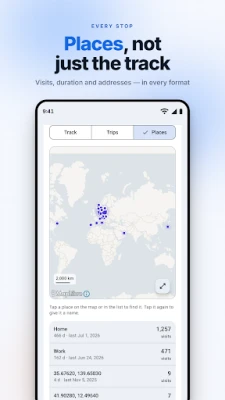
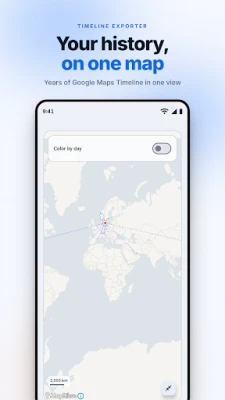
Timeline Exporter turns your Google Maps Timeline into open GPS formats — entirely on your phone.
Since late 2024, Google Maps Timeline is stored only on your device. There is no Takeout export and no website to download it from: your whole location history sits in a single Timeline.json file on your phone, with no easy way to use it elsewhere. Timeline Exporter is the tool that gets it out.
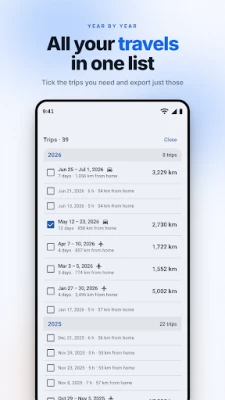
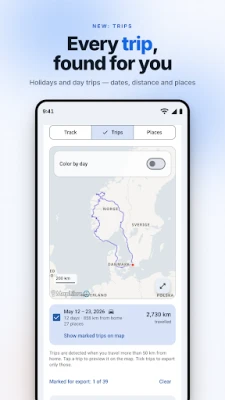
Pick your Timeline.json, preview the track on a map, filter by date, and export to GPX, KML, GeoJSON or CSV. Then open it in anything that reads GPS tracks: Strava, Garmin, Komoot, OsmAnd, Google Earth, QGIS, or your own scripts.
PRIVATE BY DESIGN
Everything happens on your device. Your location history is never uploaded — no servers, no account, no analytics, no ads. The only network use is loading map tiles for the preview. Most other converters are websites that ask you to upload your entire location history to a stranger's server; this one never does.
EXPORT FORMATS
- GPX — for Strava, Garmin, Komoot, OsmAnd and most GPS apps
- KML — for Google Earth and mapping tools
- GeoJSON — for QGIS, web maps and developers
- CSV — for spreadsheets and data analysis
FEATURES
- Works fully offline (apart from optional map tiles)
- Supports every Google export format: the current on-device export, the iOS variant, older Semantic Location History, and Records.json
- Date-range filter with quick presets (last 7 / 30 / 90 days, all data)
- Live map preview of your filtered track
- Open files straight from the share sheet
- 18 languages with an in-app language picker
- Free, ad-free and open source
HOW TO GET YOUR TIMELINE DATA
On your phone: Settings → Location → Location services → Timeline → Export Timeline data. That saves a Timeline.json file. Open it in Timeline Exporter and export. The in-app Help walks you through it.
Free and open source. No tracking, no ads, no catch.
Pick your Timeline.json, preview the track on a map, filter by date, and export to GPX, KML, GeoJSON or CSV. Then open it in anything that reads GPS tracks: Strava, Garmin, Komoot, OsmAnd, Google Earth, QGIS, or your own scripts.
PRIVATE BY DESIGN
Everything happens on your device. Your location history is never uploaded — no servers, no account, no analytics, no ads. The only network use is loading map tiles for the preview. Most other converters are websites that ask you to upload your entire location history to a stranger's server; this one never does.
EXPORT FORMATS
- GPX — for Strava, Garmin, Komoot, OsmAnd and most GPS apps
- KML — for Google Earth and mapping tools
- GeoJSON — for QGIS, web maps and developers
- CSV — for spreadsheets and data analysis
FEATURES
- Works fully offline (apart from optional map tiles)
- Supports every Google export format: the current on-device export, the iOS variant, older Semantic Location History, and Records.json
- Date-range filter with quick presets (last 7 / 30 / 90 days, all data)
- Live map preview of your filtered track
- Open files straight from the share sheet
- 18 languages with an in-app language picker
- Free, ad-free and open source
HOW TO GET YOUR TIMELINE DATA
On your phone: Settings → Location → Location services → Timeline → Export Timeline data. That saves a Timeline.json file. Open it in Timeline Exporter and export. The in-app Help walks you through it.
Free and open source. No tracking, no ads, no catch.
Đánh giá ứng dụng
Thêm nhận xét và đánh giá
Đánh giá của người dùng
Dựa trên 0 đánh giá
Chưa có đánh giá nào được thêm vào.
Các bình luận sẽ không được chấp thuận để đăng nếu chúng là SPAM, lạm dụng, lạc đề, sử dụng ngôn từ tục tĩu, chứa đựng sự tấn công cá nhân hoặc kích động sự thù ghét dưới bất kỳ hình thức nào.















Xem thêm »

Phổ biến nhất

MiniTool Power Data Recovery Free 8.5.0MiniTool Solution Ltd.

Zalo PCZalo Group

Dingtone: Calling & TextingPhone call & text message app

Payback 2 - The Battle SandboxApex Designs Games LLP

MBCambodia My BankMB Bank

Top Football Manager 2024Gamegou Limited

Duolingo: Học ngoại ngữDuolingo

War Thunder MobileTanks, ships and aircraft

King of boxingKEENGAME

Đấu trường OnmyojiDZOGAME Viet Nam
Xem thêm »
Công cụ hữu ích

TikTokTikTok Pte. Ltd.

FacebookMeta Platforms, Inc.

HWiNFO7.68REALiX
Zalo PCZalo Group
War Thunder MobileTanks, ships and aircraft

Grim Soul: Dark Survival RPGBrickworks Games Ltd

Craft of Survival - Gladiators101XP LIMITED

Last Shelter: SurvivalLong Tech Network Limited

Dawn of Zombies: Survival GameRoyal Ark

Merge Survival : WastelandStickyHands Inc.
 Games - Trò chơi
 Mạng Xã Hội
 Email - Chat - Gọi Điện
 Ứng Dụng Giải Trí
 Bảo Mật
 Phần mềm hệ thống
 Đa phương tiện
 Internet
 Tài Chính- mua sắm
 Thiết Kế
 Giáo Dục
 Công Nghệ Thông Tin
 Du lịch và địa điểm
 Android
 iOS
iOS Windows
 Mac
Mac Linux
Linux Web
Web