

Phiên bản mới nhất
Phiên bản
3.5
3.5
Cập nhật
April 13, 2025
April 13, 2025
Nhà phát triển
WA Dual Messenger: Status Save
WA Dual Messenger: Status Save
Thể Loại
Mạng Xã Hội
Mạng Xã Hội
Nền tảng
iOS
iOS
Kích thước tập tin
97.7 MB
97.7 MB
Tải ngay
0
0
Giấy phép
Free
Free
Báo cáo
Báo cáo sự cố
Báo cáo sự cố
Thông tin thêm về WT Scan for Web - Dual Account
Dual Messenger for WA, QR tools, direct messaging without saving numbers, and Status Saver for WhatsApp are all in the What Scan for Web: Second WhatsApp app.
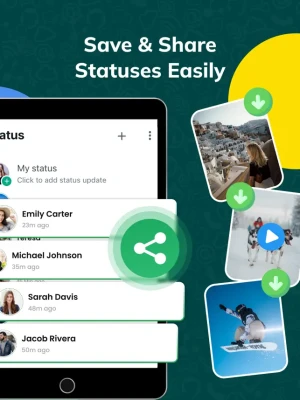
What Scan for Web: Dual Messenger for WA allows you to open two accounts on the same device by scanning the WA web QR code. Need to share a QR code? Quickly generate or scan QR codes with ease using our built-in tools. Status Saver for WhatsApp is an all-in-one utility app designed to enhance your WA experience with powerful, user-friendly tools. Whether you're managing multiple accounts, personalizing your chats, or scanning QR codes, Status Saver for WhatsApp has got you covered.
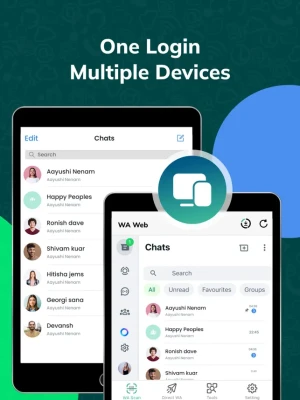
WhatsApp Web: Access your WhatsApp account on your iPad, iPhone or second device. Stay connected and manage your messages from your 2nd account with our WA Web feature, no more switching between devices.
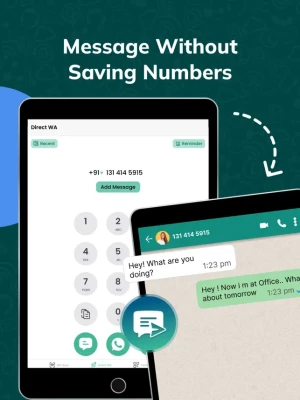
Direct Message in WA: Send messages directly to any phone number without saving it to your contacts. Perfect for quick interactions. Direct message anyone on WhatsApp without saving their contact.
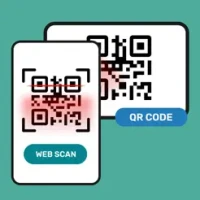
QR Scanner, Reader & Generator: Easily scan and generate QR codes. Share contact details, links, and more with a simple scan.
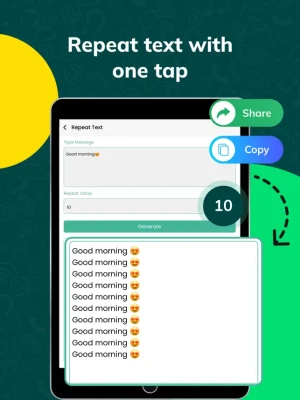
Repeat Text: Create and send repetitive text messages in seconds. Ideal for announcements, invitations, and more. Save time by repeating frequently sent messages with just a few taps.
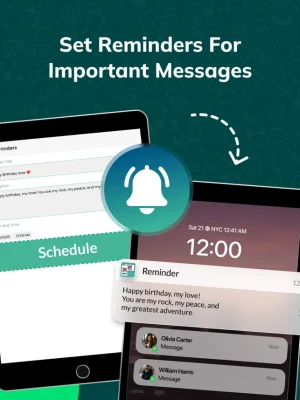
Set Reminder for Messages: Never miss sending an important message. Schedule reminders and send messages or tasks at the perfect time.
Follow these steps and use the dual chat feature:
1) Open the WA web scanning app, where you will get the QR code.
2) Open the WA application on another iPhone, iPad, or other mobile and go to the part in WA web settings.
3) Open the WA Web option and point to the previously opened QR code.
To learn about our privacy policy, please visit:
https://jayshripipaliya.blogspot.com/2024/06/privacy-policy.html
For our terms of use, please visit:
https://jayshripipaliya.blogspot.com/2024/06/terms-of-service.html
Still, have questions or comments? Reach out to us at:
jayshrikanani014@gmail.com
WhatsApp Web: Access your WhatsApp account on your iPad, iPhone or second device. Stay connected and manage your messages from your 2nd account with our WA Web feature, no more switching between devices.
Direct Message in WA: Send messages directly to any phone number without saving it to your contacts. Perfect for quick interactions. Direct message anyone on WhatsApp without saving their contact.
QR Scanner, Reader & Generator: Easily scan and generate QR codes. Share contact details, links, and more with a simple scan.
Repeat Text: Create and send repetitive text messages in seconds. Ideal for announcements, invitations, and more. Save time by repeating frequently sent messages with just a few taps.
Set Reminder for Messages: Never miss sending an important message. Schedule reminders and send messages or tasks at the perfect time.
Follow these steps and use the dual chat feature:
1) Open the WA web scanning app, where you will get the QR code.
2) Open the WA application on another iPhone, iPad, or other mobile and go to the part in WA web settings.
3) Open the WA Web option and point to the previously opened QR code.
To learn about our privacy policy, please visit:
https://jayshripipaliya.blogspot.com/2024/06/privacy-policy.html
For our terms of use, please visit:
https://jayshripipaliya.blogspot.com/2024/06/terms-of-service.html
Still, have questions or comments? Reach out to us at:
jayshrikanani014@gmail.com
Đánh giá ứng dụng
Thêm nhận xét và đánh giá
Đánh giá của người dùng
Dựa trên 0 đánh giá
Chưa có đánh giá nào được thêm vào.
Các bình luận sẽ không được chấp thuận để đăng nếu chúng là SPAM, lạm dụng, lạc đề, sử dụng ngôn từ tục tĩu, chứa đựng sự tấn công cá nhân hoặc kích động sự thù ghét dưới bất kỳ hình thức nào.














Xem thêm »

Phổ biến nhất

MiniTool Power Data Recovery Free 8.5.0MiniTool Solution Ltd.

Zalo PCZalo Group

Dingtone: Calling & TextingPhone call & text message app

Payback 2 - The Battle SandboxApex Designs Games LLP

MBCambodia My BankMB Bank

Top Football Manager 2024Gamegou Limited

Duolingo: Học ngoại ngữDuolingo

King of boxingKEENGAME

War Thunder MobileTanks, ships and aircraft

Đấu trường OnmyojiDZOGAME Viet Nam
Xem thêm »
Công cụ hữu ích

TikTokTikTok Pte. Ltd.

FacebookMeta Platforms, Inc.

HWiNFO7.68REALiX
Zalo PCZalo Group
War Thunder MobileTanks, ships and aircraft

Grim Soul: Dark Survival RPGBrickworks Games Ltd

Craft of Survival - Gladiators101XP LIMITED

Last Shelter: SurvivalLong Tech Network Limited

Dawn of Zombies: Survival GameRoyal Ark

Merge Survival : WastelandStickyHands Inc.
 Games - Trò chơi
 Mạng Xã Hội
 Email - Chat - Gọi Điện
 Ứng Dụng Giải Trí
 Bảo Mật
 Phần mềm hệ thống
 Đa phương tiện
 Internet
 Tài Chính- mua sắm
 Thiết Kế
 Giáo Dục
 Công Nghệ Thông Tin
 Du lịch và địa điểm
 Android
 iOS
iOS Windows
 Mac
Mac Linux
Linux Web
Web