

Phiên bản mới nhất
Phiên bản
5.4
5.4
Cập nhật
May 28, 2024
May 28, 2024
Nhà phát triển
Manual Focus, Exposure and WB.
Manual Focus, Exposure and WB.
Thể Loại
Đa phương tiện
Đa phương tiện
Nền tảng
iOS
iOS
Kích thước tập tin
6.8 MB
6.8 MB
Tải ngay
0
0
Giấy phép
Free
Free
Báo cáo
Báo cáo sự cố
Báo cáo sự cố
Thông tin thêm về Yamera (Manual Camera)
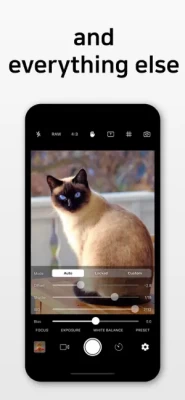
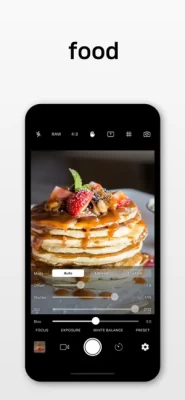
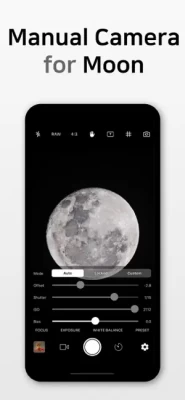
* Custom exposure for your iPhone/iPad Camera* Full independent control of Focus, Exposure and White Balance
--------------------------------------
Yamera - Full Manual Camera
【Introduction】
* Yamera is a powerful camera app with full control over your image.
* Quickly and simply adjust all parameters of your image.
* No more tapping and hoping automatic can understand what you want.
【Full Manual Control】
* Shutter
* ISO
* White Balance
* Focus
* Exposure Compensation
* Gray Card : Place a gray card in the center of the screen (more than 50% size). It will automatically adjust White Balance parameters.
【Photo Camera Features】
* Auto/Manual control of Focus/Exposure/WhiteBalance
* Timer Shot
* Digital zoom (6x)
* Stabilization
* Date Stamp
* EXIF metadata
* GeoTag
* Flash (On/Off/Auto)
* Front-camera mirroring
【Video Camera Features】
* 4K video recording
* Slo-mo video recording
* Take a photo while recording a video
* Auto/Manual control of Focus/Exposure/WhiteBalance
* Digital zoom (6x)
* Stabilization
* Max frame-rate recording
* App Library (see the below)
【Tip】
* URL Scheme = Yamera://
【App Library】
* In any situation, your photo/video is safe.
* If something goes wrong, the photo/video is automatically saved into 'App Library'.
* One of the following reasons can cause an error.
- First, the app cannot access Photos. In this case, please go to Settings -> Choose the app -> Grant Photos access rights.
- Second, there is no enough disk space. Please check the space.
【App Library - How to Use】
* You can extract files stored in App Library. Please follow the below steps.
[1] Connect your iPhone/iPad to PC via USB cable.
[2] Run iTunes.
[3] Select iPhone/iPad on the menu.
[4] Select Application on the menu.
[5] Select the app on the bottom menu.
[6] Files will be displayed on the right-side. Please copy the files to your PC.
Yamera - Full Manual Camera
【Introduction】
* Yamera is a powerful camera app with full control over your image.
* Quickly and simply adjust all parameters of your image.
* No more tapping and hoping automatic can understand what you want.
【Full Manual Control】
* Shutter
* ISO
* White Balance
* Focus
* Exposure Compensation
* Gray Card : Place a gray card in the center of the screen (more than 50% size). It will automatically adjust White Balance parameters.
【Photo Camera Features】
* Auto/Manual control of Focus/Exposure/WhiteBalance
* Timer Shot
* Digital zoom (6x)
* Stabilization
* Date Stamp
* EXIF metadata
* GeoTag
* Flash (On/Off/Auto)
* Front-camera mirroring
【Video Camera Features】
* 4K video recording
* Slo-mo video recording
* Take a photo while recording a video
* Auto/Manual control of Focus/Exposure/WhiteBalance
* Digital zoom (6x)
* Stabilization
* Max frame-rate recording
* App Library (see the below)
【Tip】
* URL Scheme = Yamera://
【App Library】
* In any situation, your photo/video is safe.
* If something goes wrong, the photo/video is automatically saved into 'App Library'.
* One of the following reasons can cause an error.
- First, the app cannot access Photos. In this case, please go to Settings -> Choose the app -> Grant Photos access rights.
- Second, there is no enough disk space. Please check the space.
【App Library - How to Use】
* You can extract files stored in App Library. Please follow the below steps.
[1] Connect your iPhone/iPad to PC via USB cable.
[2] Run iTunes.
[3] Select iPhone/iPad on the menu.
[4] Select Application on the menu.
[5] Select the app on the bottom menu.
[6] Files will be displayed on the right-side. Please copy the files to your PC.
Đánh giá ứng dụng
Thêm nhận xét và đánh giá
Đánh giá của người dùng
Dựa trên 0 đánh giá
Chưa có đánh giá nào được thêm vào.
Các bình luận sẽ không được chấp thuận để đăng nếu chúng là SPAM, lạm dụng, lạc đề, sử dụng ngôn từ tục tĩu, chứa đựng sự tấn công cá nhân hoặc kích động sự thù ghét dưới bất kỳ hình thức nào.













Xem thêm »

Phổ biến nhất

MiniTool Power Data Recovery Free 8.5.0MiniTool Solution Ltd.

Zalo PCZalo Group

Dingtone: Calling & TextingPhone call & text message app

Payback 2 - The Battle SandboxApex Designs Games LLP

MBCambodia My BankMB Bank

Top Football Manager 2024Gamegou Limited

Duolingo: Học ngoại ngữDuolingo

King of boxingKEENGAME

War Thunder MobileTanks, ships and aircraft

Đấu trường OnmyojiDZOGAME Viet Nam
Xem thêm »
Công cụ hữu ích

TikTokTikTok Pte. Ltd.

FacebookMeta Platforms, Inc.

HWiNFO7.68REALiX
Zalo PCZalo Group
War Thunder MobileTanks, ships and aircraft

Grim Soul: Dark Survival RPGBrickworks Games Ltd

Craft of Survival - Gladiators101XP LIMITED

Last Shelter: SurvivalLong Tech Network Limited

Dawn of Zombies: Survival GameRoyal Ark

Merge Survival : WastelandStickyHands Inc.
 Games - Trò chơi
 Mạng Xã Hội
 Email - Chat - Gọi Điện
 Ứng Dụng Giải Trí
 Bảo Mật
 Phần mềm hệ thống
 Đa phương tiện
 Internet
 Tài Chính- mua sắm
 Thiết Kế
 Giáo Dục
 Công Nghệ Thông Tin
 Du lịch và địa điểm
 Android
 iOS
iOS Windows
 Mac
Mac Linux
Linux Web
Web